From the alert to their desktop in one click.
See a PC that needs you, click Connect, and you're on it. No separate remote tool to buy, no IDs to hunt for, and no client reading a password to you over the phone.

How it works
Remote access rides on the PC health agent you already have on every machine.
Switch it on
Turn on remote access in Settings. At each PC's next check-in, the agent installs RustDesk and connects it to our private server.
Set up your computer once
Install RustDesk on the computer you work from, and on your phone if you like, and paste in two settings we show you. That's the whole setup.
Click Connect
Connect on any machine opens RustDesk straight to that PC with its password filled in. Nobody has to be there to let you in.
Feels like you're sitting at their desk.
Most remote tools send every frame through the vendor's crowded shared servers, and you feel it: lag when you move the mouse, blurry screens, dropped sessions. Here, your computer connects straight to theirs whenever the two networks allow it, so the picture is sharp and the mouse keeps up.
- A direct connection between your computer and theirs in most cases, with nothing in the middle
- When a direct path isn't possible, it goes through our own relay server, not a public one shared with everyone
- Connects in a second or two, so a quick fix stays quick
- Holds up on slower connections: RustDesk adjusts the picture to the bandwidth there is
Connects when you need it to.
Every PC's agent checks that RustDesk is installed, running and pointed at our server, and puts it right at its next check-in if something's off. No "the remote tool stopped working" calls.
- RustDesk runs as a service, so it's there before anyone signs in and after a restart
- If their internet or router restarts, the PC reconnects on its own as soon as it's back
Every PC ready to connect, without touching any of them.
The agent installs RustDesk, points it at our server and keeps it working. When a PC is replaced, the new one sets itself up the same way.
- An unattended password on every PC that changes on its own every day
- Passwords stored encrypted, and only shown to you inside your workspace
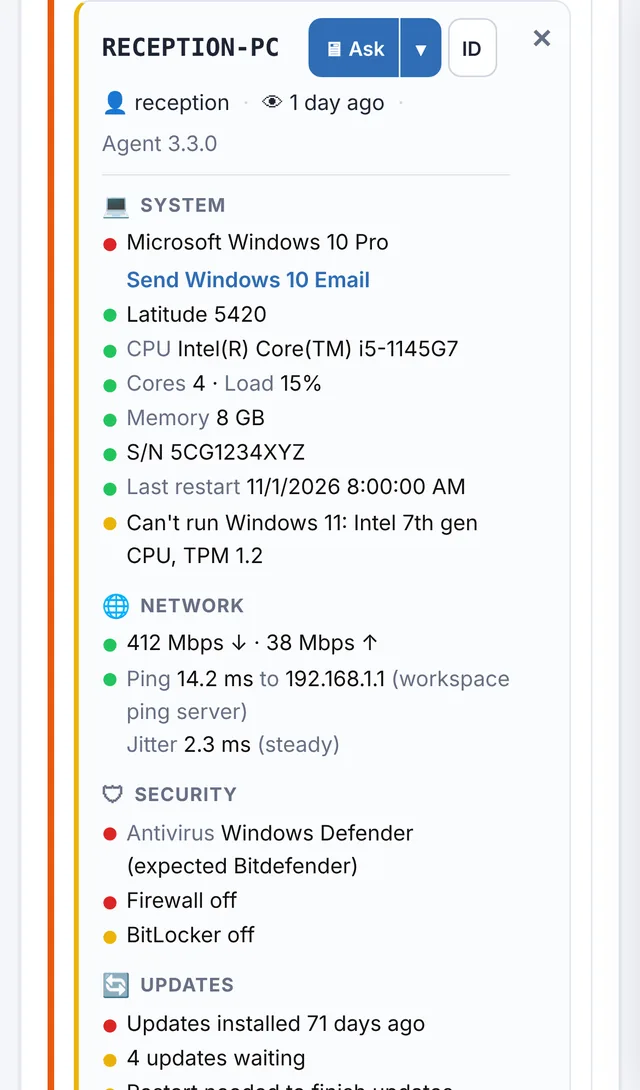
- Connect from the Alert Center, or use ID to see the ID and current password
- Out of the way: no RustDesk shortcut on the desktop, and its tray icon is hidden unless you want it shown
- Ask first or connect straight away, per client: the person at the PC can click Accept, and if nobody answers you can still get in
- On Windows PCs with two screens, the Accept box comes up on the screen they're using and flashes in the taskbar
- Leave it off on any single PC from its card, for a client who'd rather not have it there New
- Turn it off and RustDesk is removed from the PCs at their next check-in
You always know who connected, and when.
Every Connect and every password lookup is recorded in your workspace's audit log, with who did it and which machine.
- Only people with full access to your workspace and two-step sign-in can connect
- Connections go through our private RustDesk server, not a public one
PowerShell, Command Prompt and Terminal, without taking over the screen.
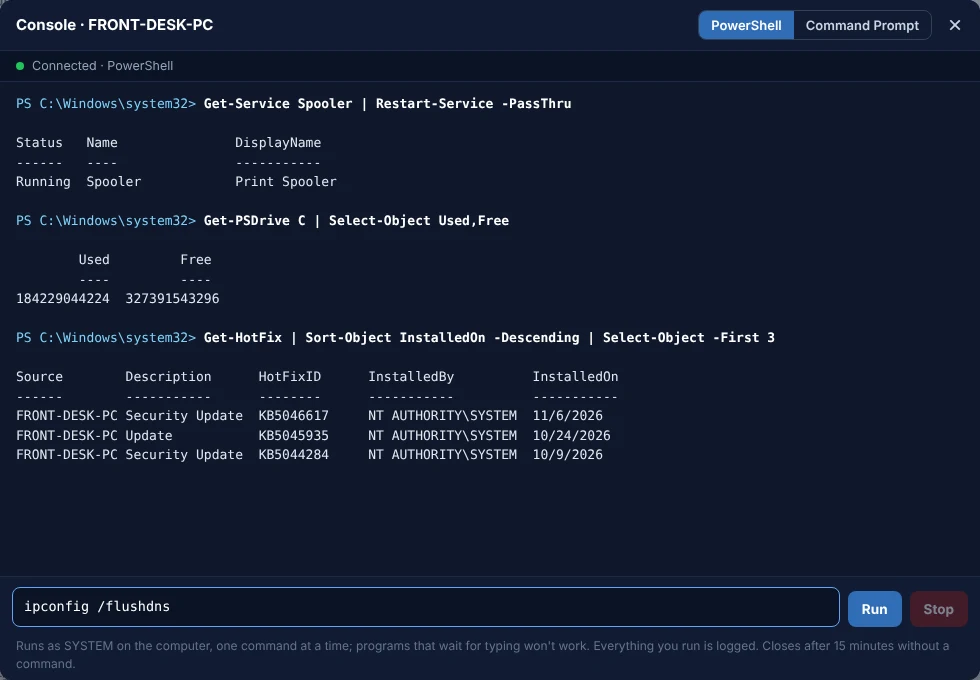
Open the console on any computer's card in the Alert Center and run commands on it, while the person keeps working. Restart a stuck service, check disk space, flush DNS, pull logs. Nobody sees a window and nobody has to let you in.
- PowerShell or Command Prompt on Windows, Terminal (zsh) on Macs
- Runs as SYSTEM or root, so admin tasks just work
- Output shows as it comes, with Stop for anything that runs too long
- Connects in about a minute on a PC someone is signed in to (otherwise at the next check-in, within 5 minutes), then answers in a second or two
- Owners and admins by default; turn it on for each technician you trust
- Every command and its output is kept, and each session is in the activity log
Grab a file from their PC, or drop one on it, without interrupting them.
Open Files on any computer's card. Browse its folders right in your browser, download what you need, and upload installers, fixes or documents to any folder. Nothing appears on their screen.
- Browse every drive and folder, starting from the signed-in person's own folder, with shortcuts to their Desktop and Downloads
- Download to your browser, or drop a file in to upload it, up to 100 MB each
- Works on Windows PCs and Macs, even where remote access is switched off
- Prefer two panes side by side? RustDesk file transfer opens RustDesk's own file manager to that PC
- Every download and upload is in the activity log, and files are deleted from the server once they're delivered

Fix a client's PC from your phone.
Out on a job when an alert comes in? Open the Alert Center on your phone and tap Ask or Connect on the machine. The RustDesk app opens straight to that PC, and you're on in seconds, with no codes to copy. You see their screen and use it like you were sitting at the desk.
- RustDesk for iPhone, iPad and Android, free from the App Store and rustdesk.com
- The same two server settings as your computer, entered once
- One tap from the alert to their screen: the same Ask and Connect buttons as on your computer
- Still recorded in the audit log, like every connection
Let clients reach their own PCs, and get paid for it.
Plenty of businesses pay for remote access to their own office computers. Offer it in their client portal at a price you set: they subscribe by card and connect to their own PCs in one click, from their computer or phone.
- Paid straight into your own Stripe account, with no cut taken: connect it once under Settings → Payments
- Stripe handles renewals, receipts and failed payments; access turns off if they cancel or stop paying
- Clients see only their own computers, and need two-step sign-in before they can connect
- Switch it on for anyone yourself when you'd rather include it, no subscription needed
- Every connection recorded in your audit log

One click from the alert to their desktop.
Free for 14 days. No credit card needed to start.
Priced by the number of PCs
Add more from your Billing page whenever you need them, and change or cancel any time.
Remote access to your clients' Macs, set up in one call.
macOS only lets the person at the Mac allow screen sharing, so Mac remote access starts with a quick phone call. Flip Remote access on this Mac on its Alert Center card, and within about three minutes the agent installs RustDesk, connects it to our private server and opens it on their screen.
- The card walks you through it: have them allow RustDesk under System Settings > Privacy & Security, in Screen Recording and Accessibility
- Once they have, Connect works like it does on a PC: one click, password filled in, nobody needs to be there next time
- The same daily rotating password, encrypted storage and audit log as on Windows
- Screen black or can't click? The card reminds you which two permissions to check
- Off by default: nothing installs on a Mac, and no permission prompt appears, until you switch it on
- Apple silicon and Intel Macs on macOS 12 or later

No per-technician fees
Everyone with full access to your workspace can connect. You pay by the number of PCs, not by the number of people.
One less tool
Monitoring, alerts and remote access in the same place, so a problem and the fix are one click apart.
Windows PCs and Macs
Set up by itself on Windows 10 and 11 PCs running the PC health agent. On a Mac, switch it on from its card while you're on the phone with them (see above). RustDesk on your side runs on Windows, Mac, Linux, iPhone and Android.
Stop paying for a separate remote tool.
Start a free 14-day trial. No credit card needed to start.