Bill your monthly support plans where you manage the clients.
Connect your own Stripe account and SilverTech Master System matches every subscription to the right client, beside their computers and support plan. Sign-up forms, coupons, one-time charges, refunds and failed-payment alerts are built in, with no separate billing app and no cut of your revenue.
Everything a support business bills
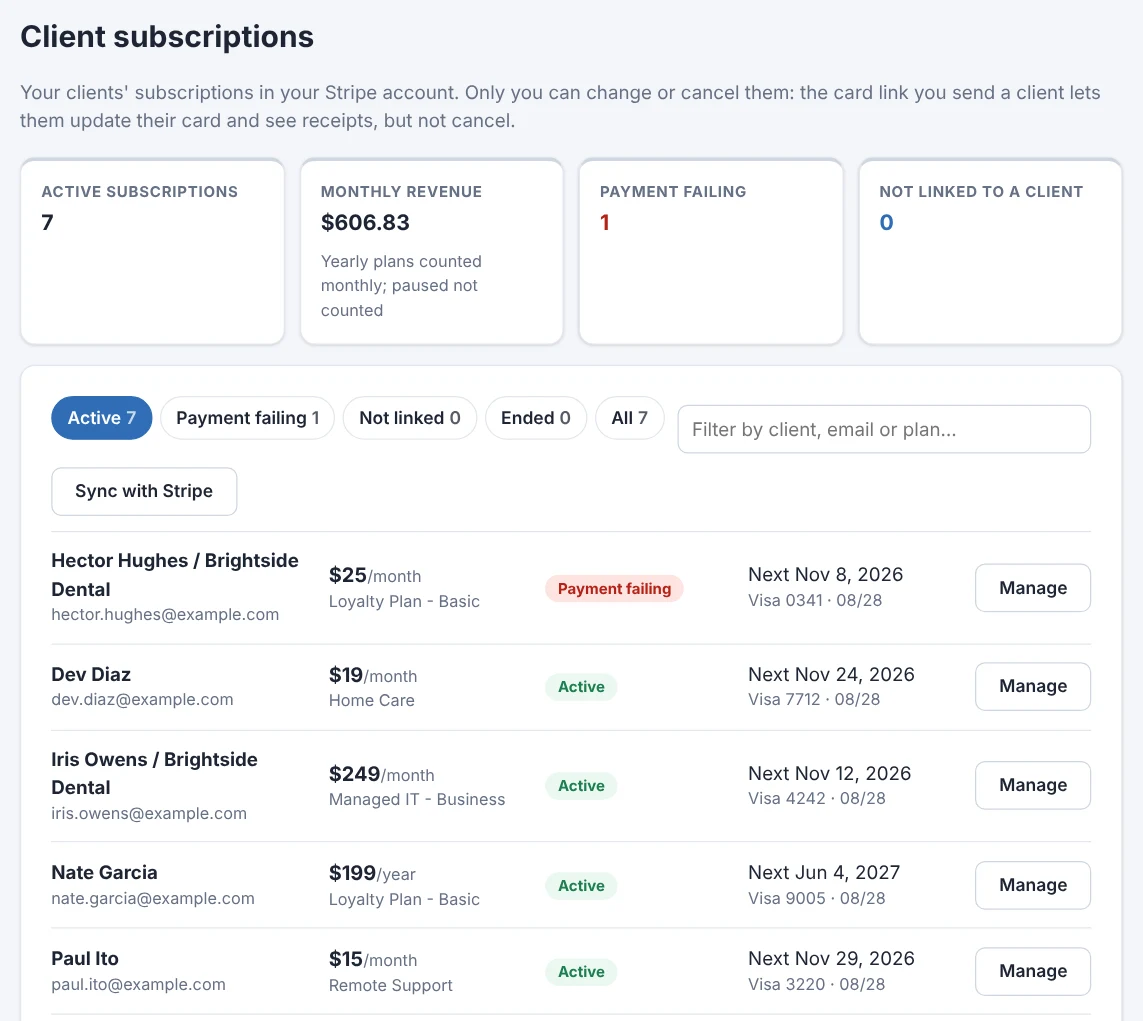
Subscriptions, matched
Every subscription in your Stripe account, matched to clients by email or linked by hand with a quick search.
Sign-up forms
A form for each plan you sell, linked or embedded on your website with one line of code. Payment happens on Stripe's secure page.
Coupons & trials
Percent or dollars off, once, for a few months or for good, plus setup fees and free trials.
One-time charges
Charge a client's card now or add a charge to their next bill, with your description on the receipt.
Full or partial refunds
Refund any payment, all of it or just part, back to the card it came from, right from the client's payment list. Every refund is logged.
Pay-any-amount pages
Clients type what they owe, or your link fills the amount in. Handy for invoices paid by card.
Failed payments, flagged
Payments that fail show in the Alert Center with Stripe's next retry, and a card update link goes out in one click.
Their plan, their payments and their computers on one page.
Open a client and their subscription sits beside their loyalty or support plan: change the amount, pause, resume or cancel from the next charge on, see recent payments and receipts, refund a payment in full or in part, and see what the next bill comes to.
- Monthly revenue at a glance
- The money goes straight to your Stripe account
- Clients can update their card and see receipts, but only you can cancel
New clients sign themselves up.
Make a sign-up form for each kind of plan: one or more prices, billed weekly, monthly, quarterly, yearly or every few months, with your own questions like "Business name". The new subscription lands in your list, matched to the client.
- Your brand's name, logo and color; a thank-you message or your own page after
- Pause a form any time
- Run more than one brand? Copy a form and pick the other brand in one step

Connect Stripe and see your subscriptions matched to clients in minutes.
Free for 14 days. No credit card needed to start.
Questions
Do I need my own Stripe account?
Yes. SilverTech Master System connects to your Stripe account, so payments, payouts and receipts stay yours. There's no extra fee on top of Stripe's.
Does it send invoices?
It manages subscriptions, sign-ups, one-time charges, refunds and pay-any-amount pages. It isn't a full accounting or invoicing system; keep your bookkeeping software for that.
Can clients cancel on their own?
No. Clients can update their card and see receipts. Only you can cancel or change a subscription.
What about PayPal?
Subscriptions run through Stripe. Payment and donation forms on websites you build can take PayPal through your client's own PayPal account.
Your plans, your Stripe account, your clients in one place.
Free for 14 days. No credit card needed to start.