Spot the problems before your clients notice them.
A small agent on each Windows PC and Mac checks the things that actually go wrong (updates, antivirus, failing disks, worn batteries) and reports to your workspace twice a day. Your brand sits in the client's taskbar, one click from calling you.
Install it the way you already work.
Copy the install command from your workspace and run it on a PC (or paste the Mac command into Terminal), drop it into your RMM as a script so every new machine gets it automatically, or download a ready-made Windows (.msi) or Mac (.pkg) installer.
- Runs as SYSTEM in the background, whether or not anyone is signed in: every hour, every 12 hours or once a day, your choice, plus after every restart
- New PCs appear under Assign New Machines with a suggested client
- Updates itself when a new version comes out; nothing to redeploy
- Moving from an older script? Each PC keeps its identity and history
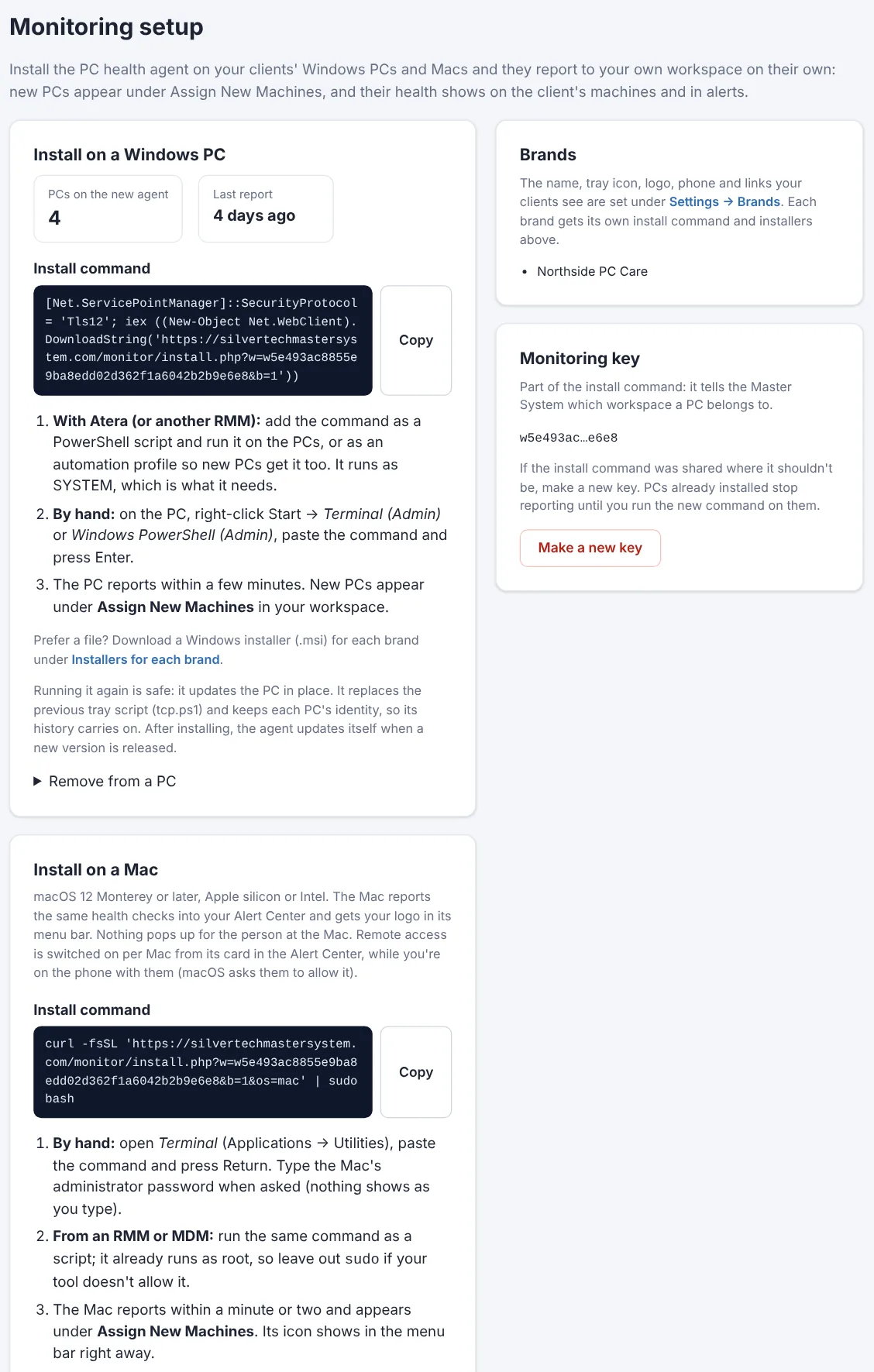
A Windows .msi and a Mac .pkg, made for your brand.
Rather hand over a file than a command? Each of your brands gets its own installers, named after it, with steps for installing by hand or silently.
- Double-click to install, or push the .msi silently with
msiexec /qnfrom your RMM or Group Policy - The .pkg installs with a double-click or
installer -pkgfrom your RMM - Shows under your brand's name in Windows' installed apps, and uninstalls from there
- Always installs the latest agent: it's fetched from your workspace as it runs
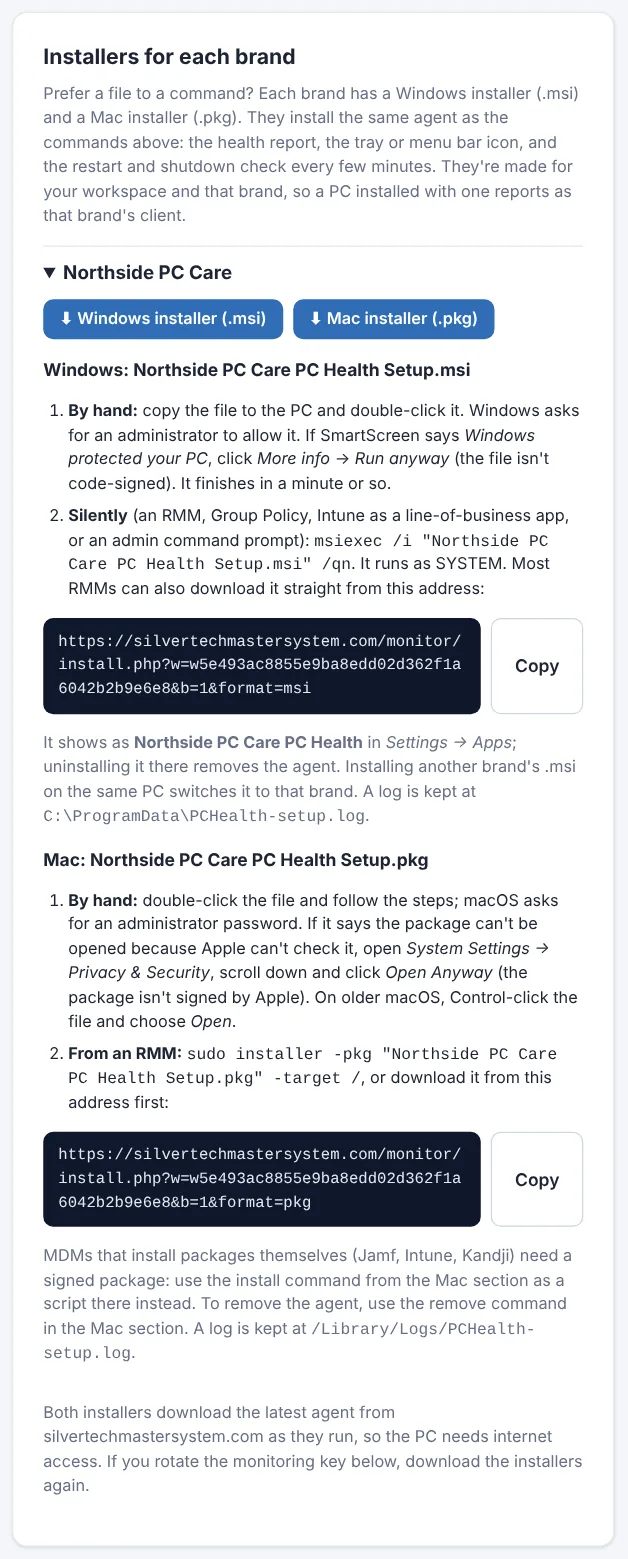
Your Mac clients, in the same Alert Center.
Paste one command into Terminal on a Mac (or run it from your RMM or MDM) and it reports alongside your Windows PCs, with your logo in its menu bar.
- macOS version and updates waiting, FileVault and antivirus (Bitdefender and others, or Apple Security, the protection built into macOS)
- A flag when a Mac is on a macOS version Apple no longer patches
- Disk health, free space, battery health, internet speed, ping and jitter
- The same menu as on Windows: book a visit, the machine dashboard, your phone number
- Nothing pops up for the person at the Mac: no permission prompts and no notifications
- Remote access when you want it: one switch on the Mac's card sets up RustDesk while you're on the phone with them
- Apple silicon and Intel Macs on macOS 12 or later; it updates itself like the Windows agent
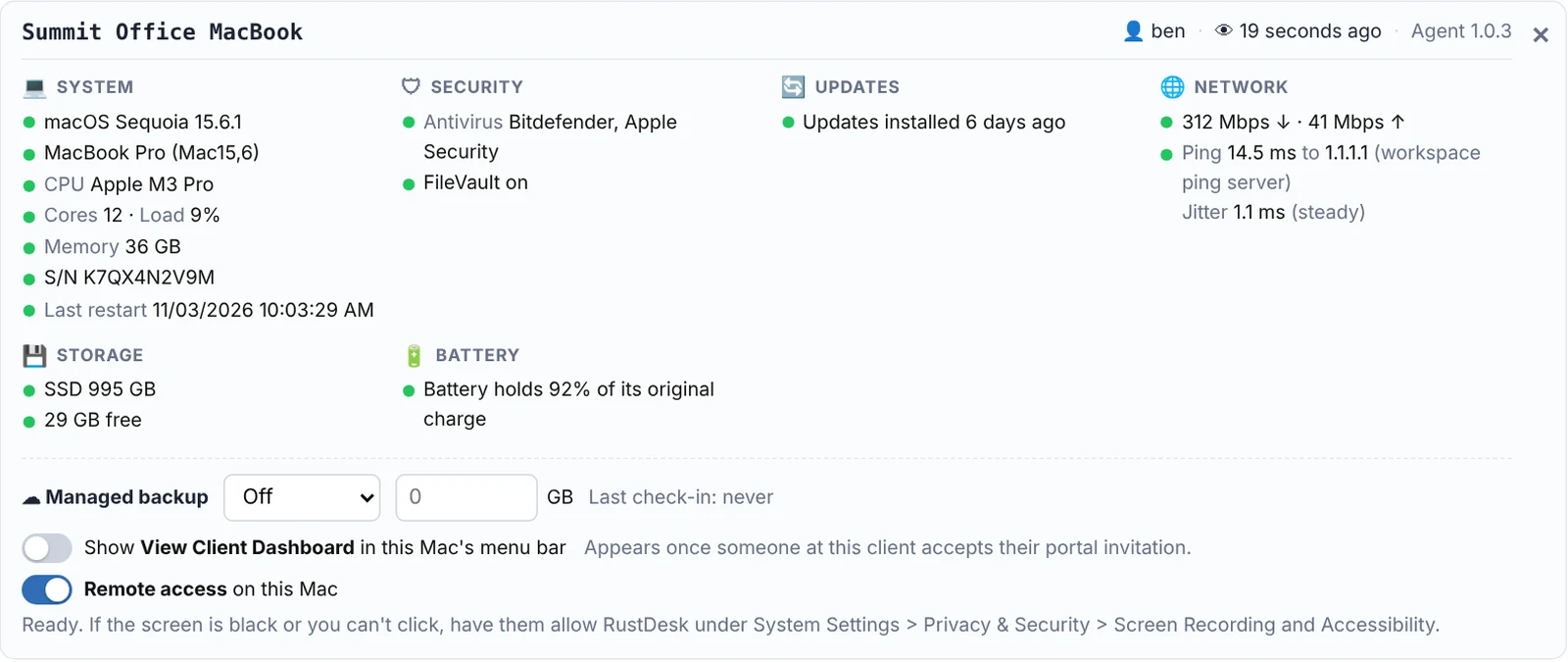
What it checks on every PC
Each check has a threshold you choose, and anything past it shows up in your Alert Center and your morning email.
Windows Update
When updates last installed, how many are waiting, and whether a restart is needed to finish them.
Antivirus
Any brand, not just one. Real-time protection, how old the virus definitions are, and whether it's the antivirus you expect.
Security
Firewall, BitLocker drive encryption and Windows activation, flagged the moment something is off.
Disk health
Drive health and SSD wear, free space on every drive, disk errors and temperature, so you replace a drive before it fails. After a replacement, one click clears the old error count.
Battery
How much of its original charge a laptop battery still holds, with a warning when it's time for a new one.
Windows 11 readiness
For PCs still on Windows 10: whether they can upgrade, and if not, why (TPM, Secure Boot or CPU).
Hardware & uptime
Model, serial number, processor, memory, disk type and size, and how long since the last restart.
Managed backup
PCs where Syncthing, your managed backup, isn't running or has no backup level set (so it isn't billed) are flagged in one place.
Internet speed, ping & jitter New
A download and upload test once a week (skipped on battery), plus ping, jitter and lost pings at every check-in, to the client's own server or one you choose. "The internet is slow" comes with numbers, and each client shows its averages. Flags for high ping, high jitter, slow internet speed and a client server that can't be reached, at limits you set.
Read a computer's health in five seconds.
Each PC gets a card in the Alert Center, grouped the way you think about it: system, security, updates, storage, battery, backup, network and software. Every line starts with a status dot: green when it's fine, yellow when it's worth watching, red when it needs you.
- Spot the red dots at a glance, without reading every line
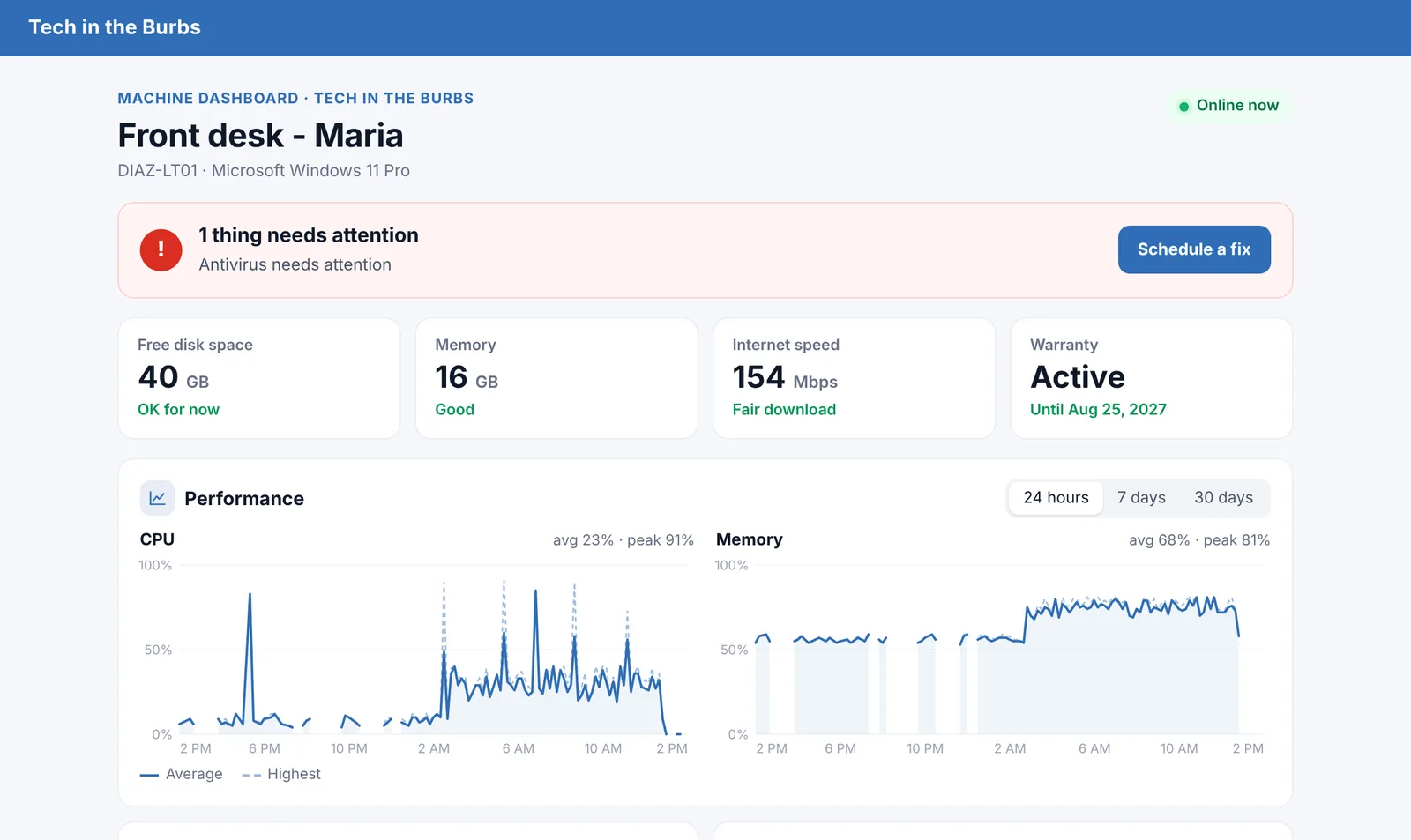
- Give a computer a nickname, like who uses it ("Front desk - Maria"), and find it by that name New
- The email for each problem sits right next to it: low disk space under Storage, Windows 10 under System
- Online or offline right now, who's signed in, when someone last used it, when it was last heard from (hover for the last full check-in) and its agent version at the top
- Offline alerts for servers and anything that should always be on: an email when it stops checking in for 10 minutes (or however long you choose), and another when it's back New
- Connect with remote access, or restart or shut it down with a message on their screen (they can postpone it if you allow), from the same card
- Done with a computer? Remove agent takes the agent (and RustDesk, if the agent put it on) off it at its next check, with no one at the keyboard New
Scripts that run themselves, client by client.
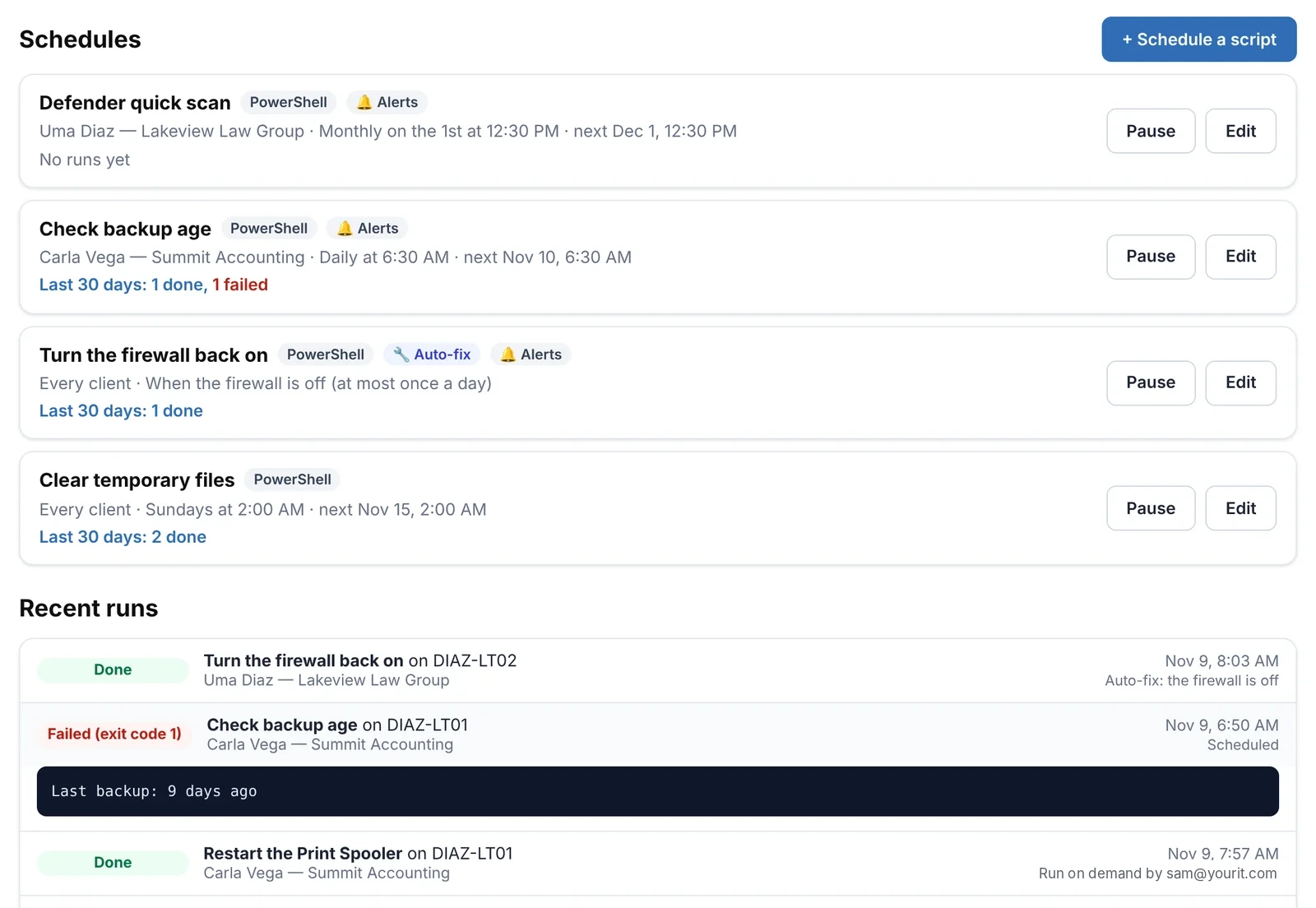
Keep a library of PowerShell, Command Prompt and Mac scripts, then schedule them for a client: every computer they have, or just the ones you pick. Clear temp files every Sunday, check the backup every morning, run a Defender scan on the 1st. Or run one on a single computer right now from its card.
- Auto-fix: attach a script to an alert, like low disk space, the firewall off or old virus definitions, and it runs as soon as a computer reports the problem, then checks the computer again so the alert clears New
- For one client, several, or every client except the ones you leave out; leave a single client or computer out right from its own page
- Once, every few hours, daily, weekly or monthly, in your time zone
- Computers that were off catch up when they're back on, within a window you choose, or skip it until next time; new computers for that client get it automatically
- Runs as SYSTEM or root with nothing on their screen, and every run's output and exit code is kept
- Set a schedule to alert you when its script fails: it shows on the computer's card and in your morning email
- Change a script and its schedules wait until you've looked them over, so nothing runs that nobody checked
- Ready-made examples to start from, and technicians only get it when you allow it
The everyday upkeep, without writing a script.
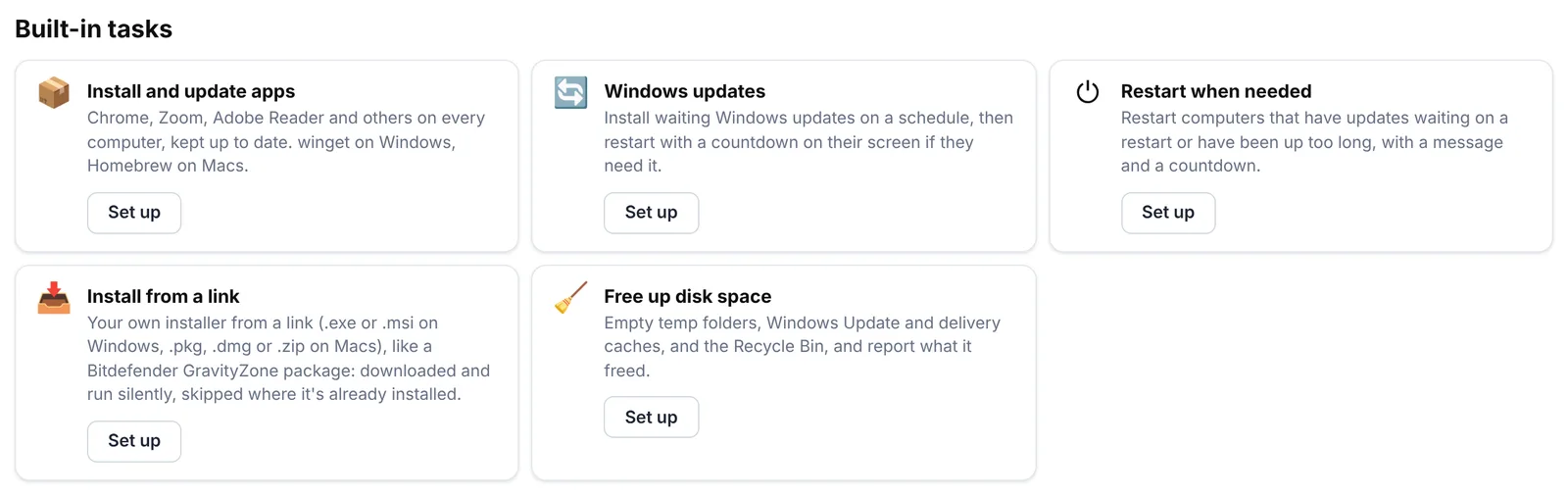
Pick a few options and STMS writes the script for you, then schedule it for a client like any other.
- Install and update apps: Chrome, Zoom, Adobe Reader, Teams and more, or any winget or Homebrew app, installed where they're missing and kept up to date, or simply update every app on the computer
- Install from a link: your own .exe or .msi, or a .pkg, .dmg or .zip for Macs, like a Bitdefender GravityZone package, run silently and skipped where it's already installed New
- Windows updates: install what's waiting on your schedule, skip upgrades to a new Windows version, and restart only if the updates need it
- Restart when needed: computers with updates waiting on a restart, or up too long, restart with your message, a countdown and postpones you allow
- Free up disk space: temp folders and update caches (and the Recycle Bin if you choose), with how much it freed
- Every run's output is kept, and a schedule can alert you when it fails
See what's installed. Remove it. Push what's missing.
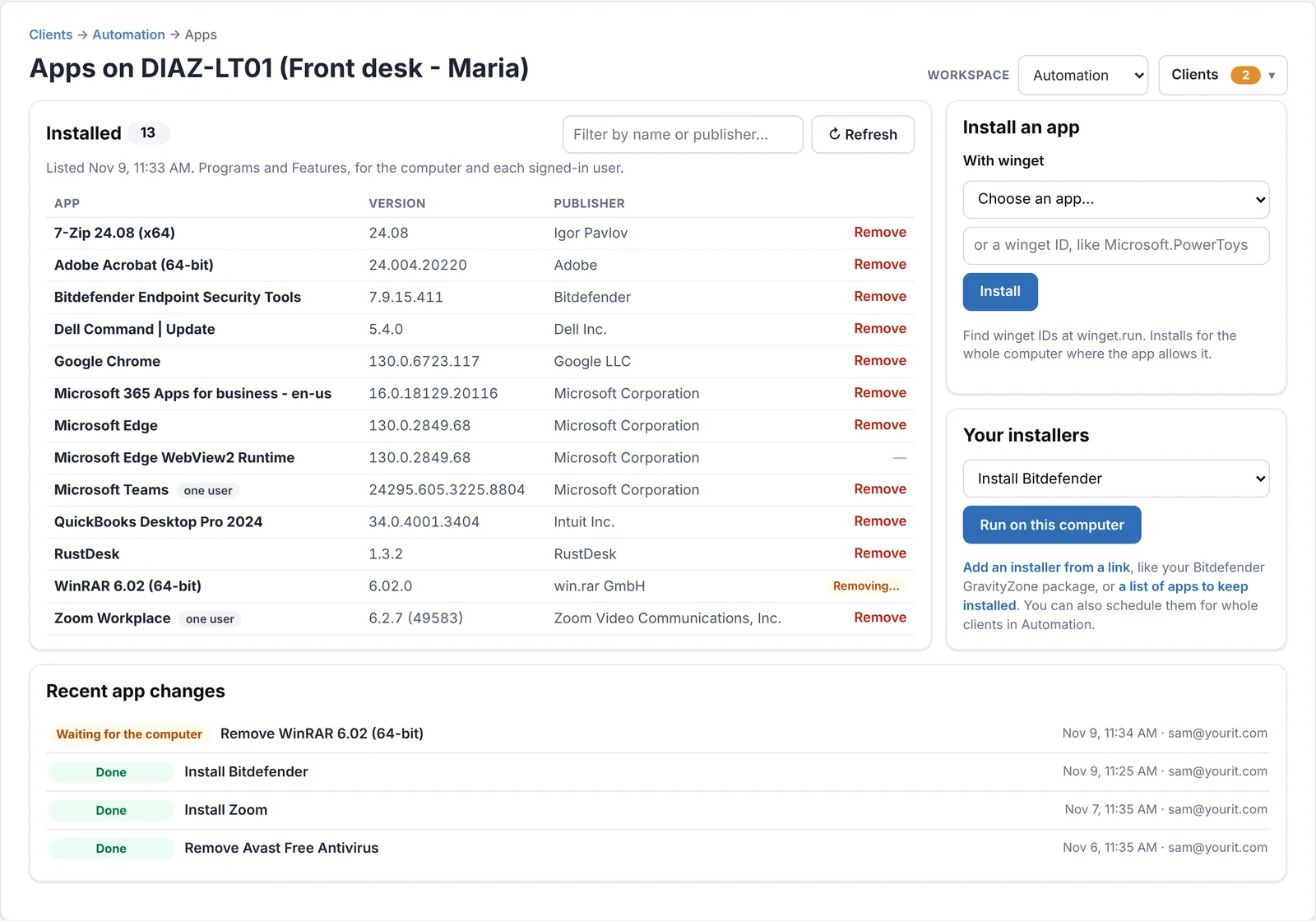
Open Apps on any computer's card and get its full list of installed programs, then clean it up or add to it without remoting in.
- Every program with its version and publisher, including apps installed for just one user, and a filter to find one fast
- Remove anything with an uninstaller, silently: MSI, Inno Setup and NSIS installers, with winget as a fallback
- Outdated software: every computer lists its apps each week; list the versions to watch for (like Google Chrome older than 131) and they're flagged in the Alert Center, the alert email and one list across all computers
- Install from a ready list, or search the whole catalog by name and pick the app: winget's on Windows, Homebrew's on Macs
- Your installers: add your Bitdefender GravityZone package, or any .exe or .msi (.pkg, .dmg or .zip on Macs) from a link, once, then push it to a computer in one click or schedule it for whole clients
- The list refreshes itself after every change, and every install and removal keeps its output
"It's been slow all week." Now you can see it.
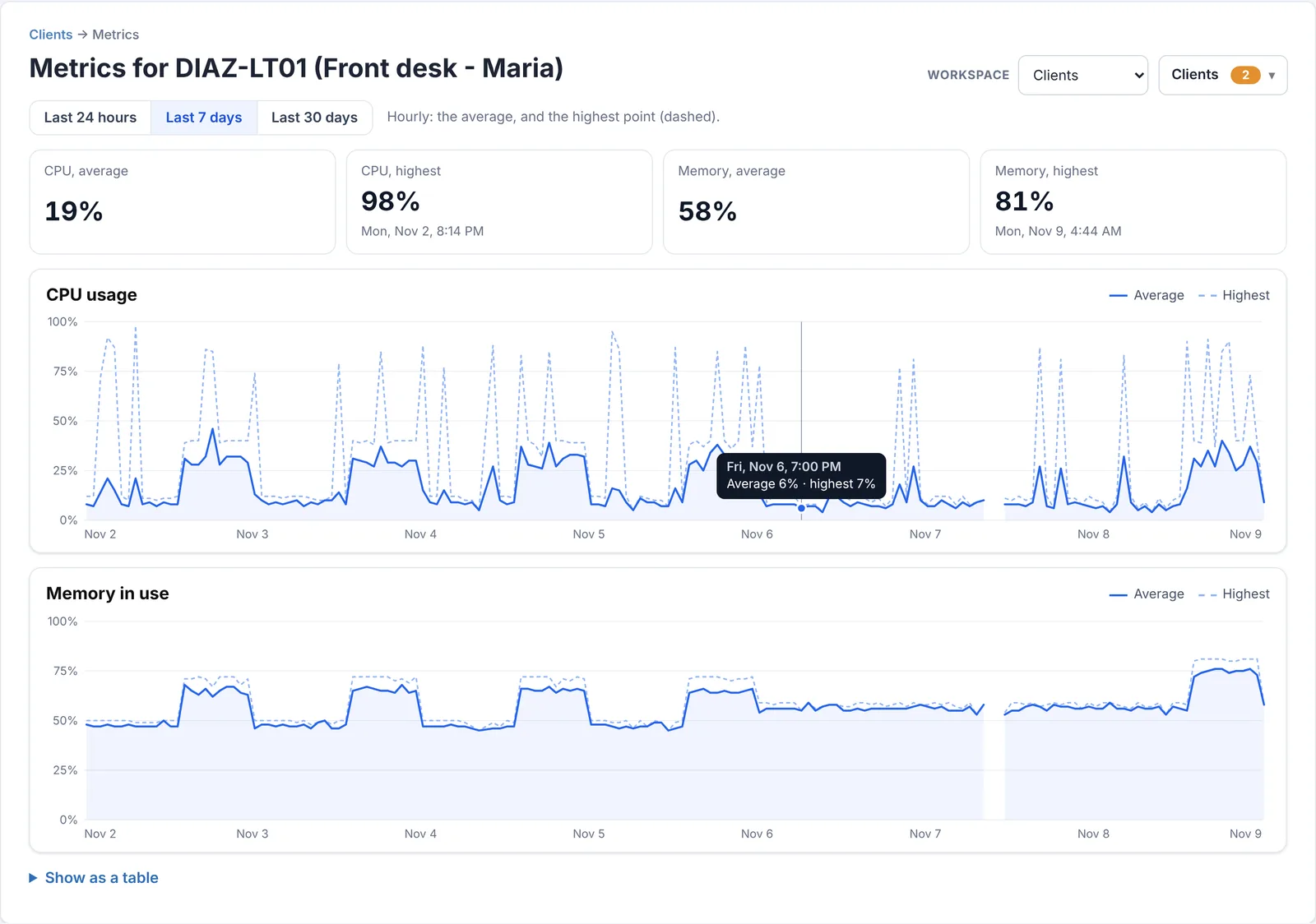
Every computer sends its CPU and memory use every few minutes. Open Metrics on its card for line charts of the last 24 hours, 7 days or 30 days.
- The average and the highest point for each stretch, so a spike doesn't hide in an average
- Averages and peaks at a glance, with when the peak happened
- Hover any point for the exact numbers, or switch to a table
- Gaps show when the computer was off
- Flags a computer whose CPU or memory stays above your limit for as long as you choose (say, 90% for 30 minutes), in Needs attention and your alert email, with a Memory upgrade recommended email one click away for computers short on memory New
- The card also shows its public IP address and its address on the local network
See every client PC at a glance.
Free for 14 days. No credit card needed to start.
The first place they look when something's wrong: you.
Every monitored PC gets a tray icon with your logo. One click and your client can book a visit, see their computer's health, or get your number.
- Upload your own icon; PCs pick up a new one on their own
- Schedule link, phone, email and the machine dashboard in one menu
- On the PCs you choose, View Client Dashboard opens their client portal, once they've accepted your invitation
- Looks like Windows' own menus, in light or dark mode
- On the phone with them? Have them hold Ctrl (Control on a Mac) with the menu open and click Check in now for a fresh health report New
- Run more than one brand? Each gets its own icon, install command and installers
Show clients the health of their own computer, on your website.
"View Machine Dashboard" opens a page on your own website with that PC's health in plain language: "Everything looks good", or what needs attention and a button to book you for it.
- Hosted on your site, so it carries your name, not ours
- CPU and memory charts for the last 24 hours, 7 days and 30 days, so "it's been slow" has an answer New
- Choose which sections show: details, health check, software, internet speed, performance, backups
- A fresh, clean design that works on phones, with Schedule, Call and Email buttons
- Optional offers for antivirus and managed backup when a PC needs them
- Turn it off completely and it disappears from the tray menu too
Alerts that come to you
The agent does the checking. You get the short list.
Alert Center
Needs Attention lists every problem by type. Click a computer to jump to its card, or send the right email from the same row.
Morning email
One summary each day: overdue updates, PCs that haven't restarted, security gaps, failing disks and worn batteries.
Your thresholds
Days since updates, days without a restart, SSD wear, battery health, BitLocker required or not, and which checks count toward a client's alert total. Set them once in Settings.
Put the agent on your first PC in minutes.
Free for 14 days. No credit card needed to start.
Connect to them, too
The same agent can set up remote access on every PC, so you can jump on a machine straight from its alert. See remote access →
Put it on your clients' PCs today.
Start a free 14-day trial and install the agent on your first PC in minutes.
Monitoring works with Windows 10 and 11 PCs and with Macs on macOS 12 or later. Remote access is for Windows PCs.