Keep every client PC patched, without babysitting Windows Update.
SilverTech Master System shows you which computers are behind, installs what's waiting on the schedule you set, keeps third-party apps up to date, and tells you when something didn't work. It's patching for small IT businesses: clear, scheduled and checked.
From "who's behind?" to "all done"
See who's behind
Each computer reports when updates last installed, how many are waiting, and whether a restart is needed to finish them.
Install on your schedule
A built-in task installs waiting Windows updates for a client's computers: weekly, monthly or whenever you choose, in your time zone.
No surprise upgrades
Skip upgrades to a new version of Windows, so a routine patch night doesn't become a feature update.
Restart only when needed
Restart only the computers whose updates need it, with your message, a countdown and postpones you allow.
Third-party apps
Keep Chrome, Zoom, Adobe Reader, Teams and any winget (Windows) or Homebrew (Mac) app up to date, or update every app on a computer.
Outdated software alerts
List the versions to watch for, like Chrome older than a certain version, and they're flagged across every computer.
Patch night runs itself. You read the results.
Schedule the Windows updates task for a client, or every client except the ones you leave out. Computers that were off catch up when they're back on, within a window you choose. Every run keeps its output, and a schedule can alert you when it fails.
- Overdue updates and PCs that haven't restarted show in Needs attention and your morning email
- Auto-fix: run a script the moment a computer reports a problem
- Technicians only get scheduling when you allow it

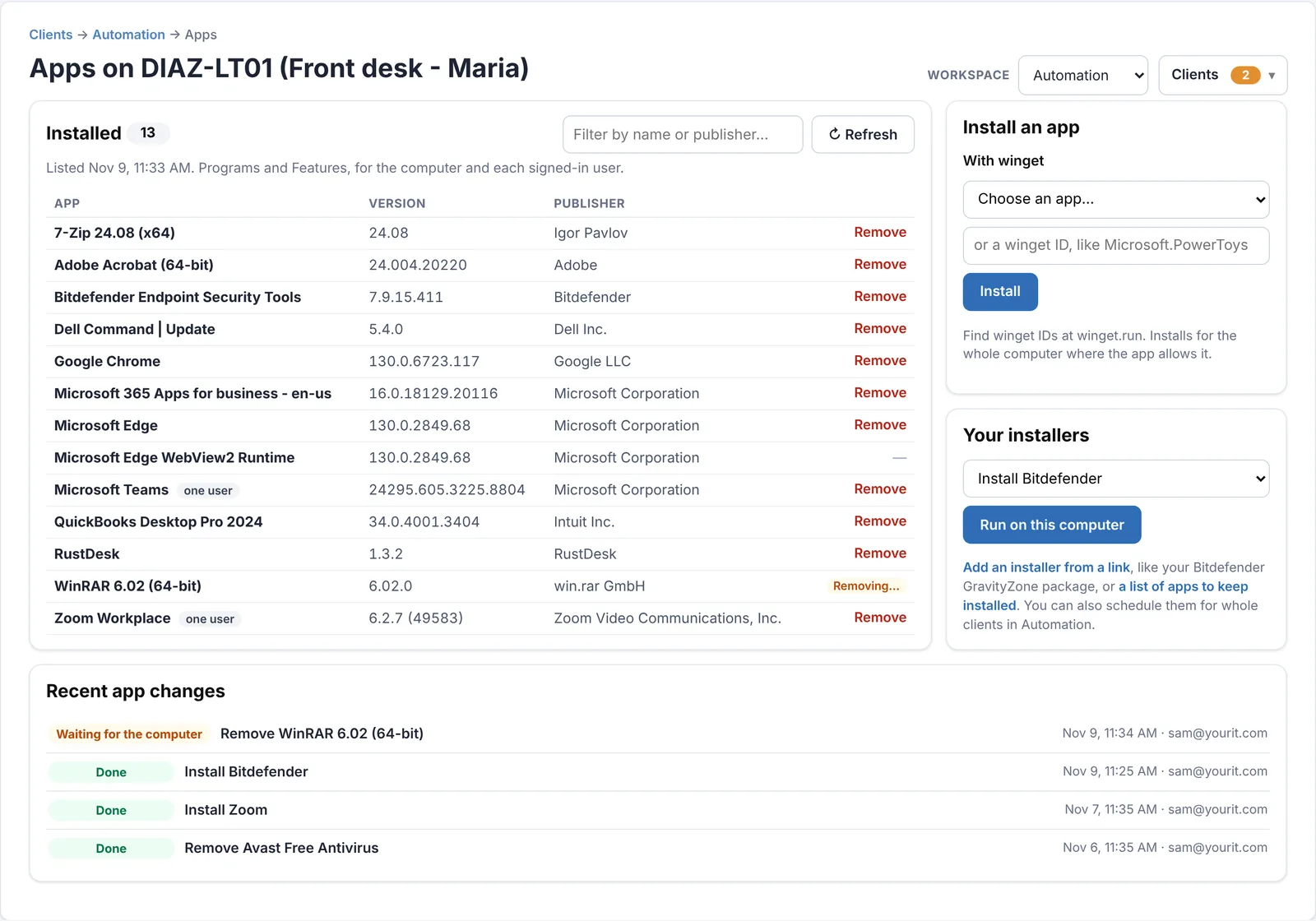
See every installed app, and its version, on every PC.
Each computer lists its installed programs every week. Remove what shouldn't be there, push what's missing from winget or Homebrew, or install your own .exe, .msi or .pkg silently from a link.
- Every program with its version and publisher, including per-user installs
- One list of outdated software across all computers
- macOS: updates waiting and Macs on a version Apple no longer patches
What it is, and what it isn't
Look at an enterprise patching tool if you need
- Approval rings and per-patch approval before anything installs
- Patch compliance reports for auditors
- Linux server patching
SilverTech Master System covers
- Windows updates on a schedule, without feature upgrades
- Third-party app updates through winget and Homebrew
- Clear alerts for computers that are behind or need a restart
Schedule your first patch night this week.
Free for 14 days. No credit card needed to start.
Questions
Does it approve individual patches?
No. It installs the Windows updates that are waiting, skipping upgrades to a new Windows version. To hold a computer back, leave it out of the schedule from its own page.
Which apps can it update?
Anything in winget's catalog on Windows and Homebrew's on Macs, which covers most common business apps, plus your own installers from a link.
Will it restart computers while people are working?
Only if you schedule it to, and only the computers that need it. People see your message and a countdown, and can postpone if you allow it.
Can it update Macs?
It updates Mac apps through Homebrew and shows waiting macOS updates and unsupported macOS versions on each Mac's card.
Related
Patched, restarted and reported, on your schedule.
Free for 14 days. No credit card needed to start.